SKA PSS CI Systems User Guide
This guide contains instructions on how to deploy Cheetah: a pulsar and transient search application. Cheetah is deployed using a python application called the iac_deployer: a bespoke deployment tool that is provided by the SKA PSS CI Systems repository.
A brief introduction to Cheetah
Cheetah is a pulsar and transient search application. Cheetah is still in development and different target hardware is being trialled with the aim of finding the setup that processes data the fastest. These different setups also require Cheetah to have the accompanying software packages integrated into Cheetah. For example different GPU’s and FPGA’s are being trialled as well as combination of GPU’s and FPGA’s. The different setups of Cheetah are referred to as ‘spins’. Flags are used at build time to build each spin. For example Cuda software is included in the build for a spin that includes GPU’s.
The development lifecyle of Cheetah is supported by the combined practices of Continuous Integration and Continuous Deployment (CI/CD). The CI element of the development lifecycle (i.e., automated builds of Cheetah, followed by testing and publishing of Cheetah) is performed using Gitlab CI pipelines. The CD element is performed by the iac_deployer tool. This tool is a python wrapper around Anisble. Ansible is an open source IT automation engine that automates provisioning, configuration management, application deployment, orchestration, and many other IT processes. The focus of this document is the CD but will reference CI to demonstate the full CI/CD workflow.
For further details about Cheetah see: Cheetah Documentation
For further details about Ansible see: Ansible Website
For further details on the available Cheetah spins please see the following page on Confluence (SKAO only): Software Teams and Organisation/Data Progressing Agile Release Train/Pulsar Search Team/Cheetah Spins
Overview of CI/CD workflow
Continuous Integration
In the Cheetah repository there is a CI pipeline that packages and publishes each Cheetah spin. It is triggered whenever the main branch of the repository has changes merged to it from upstream development branches. This signifies a new release of the Cheetah software. The CI pipeline packages Cheetah according to the software packaging format for the Debian Linux Distribution and its derivatives, then publishes the packages to the Central Artifact Repository (CAR). Therefore all Cheetah releases are available for download from the CAR.
Continuous Deployment
Continuous Deployment is performed using the iac_deployer tool. This tool is currently manually run by a user but will likely be automated in future. The tool runs Ansible commands to perform deployments but restricts access to these commands from the user. This prevents the user making mistakes or changing the commands and guarantees a deployment has been done correctly.
The CI Systems repository contains Ansible scripts, which are run by the iac_deployer using Ansible commands, that retrieve the required Cheetah packages from the CAR and installs them on one or multiple machines simultaneously. As part of this process, all the relevant dependencies for a given Cheetah spin are installed.
See the image below for overview of CICD workflow:
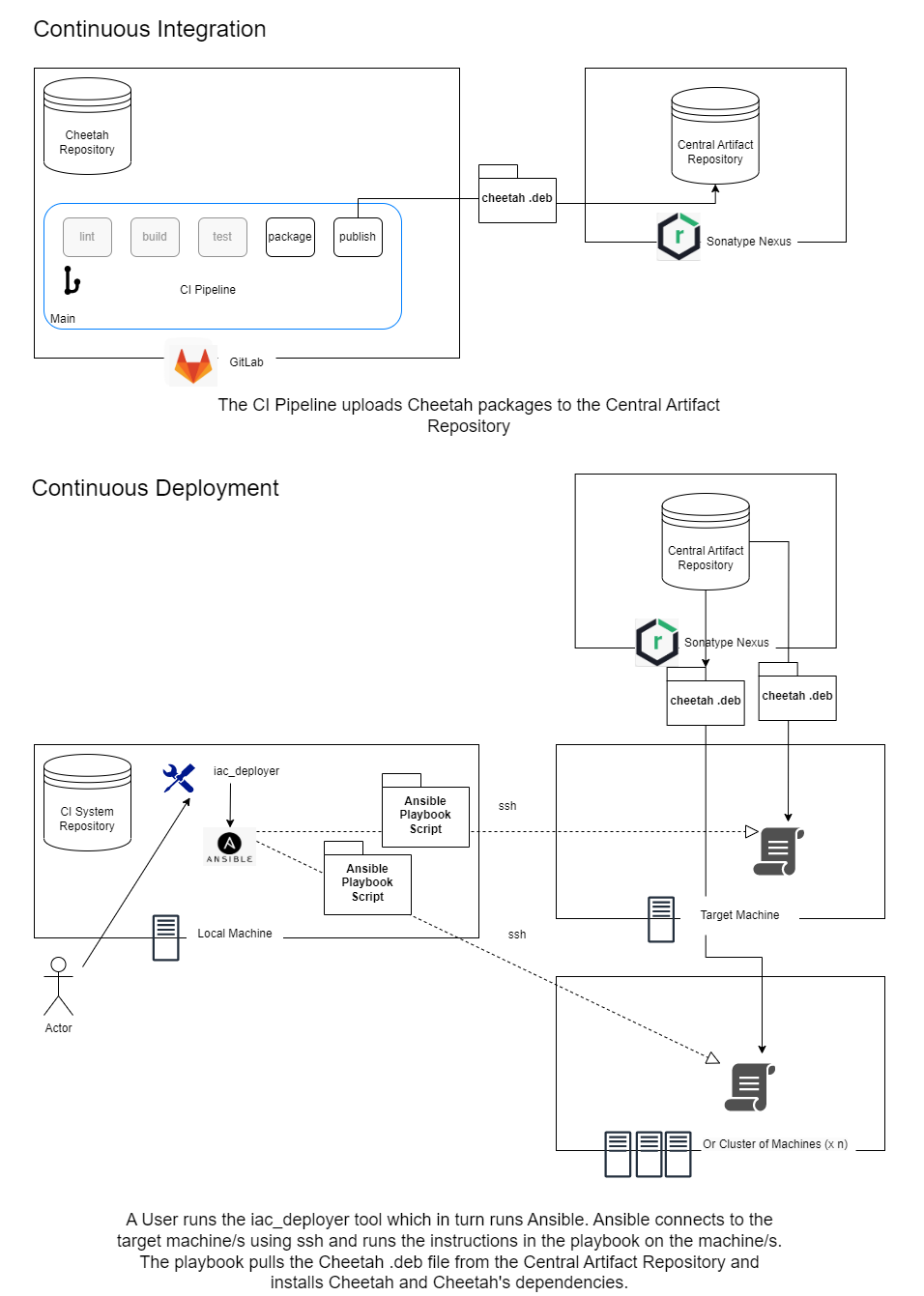
Overview of the iac_deployer tool
The CI Systems repository should be cloned onto a machine that is not the target machine. This is referred to here as the ‘local’ machine. The local machine communicates the configuration instructions to the target machine using ssh and there is therefore a client-server relationships between the local machine and the target machine.
The iac_deployer tool can be found in the root directory of the repository and should be run on the local machine. Details on running the tool are in later sections.
Below is a diagram to give some context.
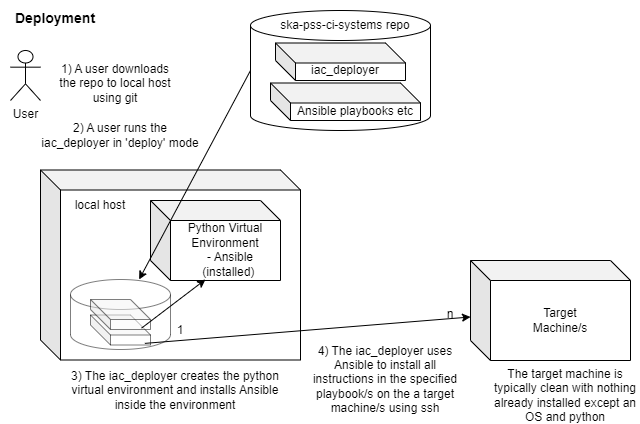
Prerequisites
- The local machine must have the following installed:
Python3
git
The target machine or machines need to be accessible by ssh from the local machine.
Cloning the CI systems repository
The repository can be cloned to a local machine using the following command. If you have GitLab SSH keys set up:
$ git clone git@gitlab.com:ska-telescope/pss/ska-pss-ci-systems.git
Deployments can only be made from the main branch. Switch to the main branch using the following commands:
$ cd ska-pss-ci-systems
$ git checkout main
Initialising the virtual environment on local machine
The first time the iac_deployer is executed, Ansible and other required pip packages will be installed within a Python virtual environment, which will be located in the venv directory at the repository’s root. To run the tool use the following command:
$ ./iac_deployer
Using the iac_deployer to deploy Cheetah
Given the PSS Team support multiple machine configurations, that relate to our spin configurations, there are multiple ‘playbooks’ available for deploying Cheetah. ‘Playbook’ is an Ansible term. These playbooks are targeted at different hardware configurations e.g. machines with GPU’s or FPGA’s or both. These playbooks contain the sets of instructions to install Cheetah spins and the required dependencies for each spin. A spin relates to a target hardware configuration. e.g. if the target machine has a GPU, the Cuda application will be installed if a deployment is done using the related playbook.
For further details about Ansible playbooks see: https://docs.ansible.com/ansible/latest/playbook_guide/playbooks_intro.html
The inventory file
The inventory file is where network addresses (or hostnames) of all the machines onto which an application is deployed are configured. This file is called ‘production’ and it can be viewed in the following directory:
ansible/production
Performing a deployment
The available playbooks that can be used for a deployment are in the following directory:
ansible/hosts/
To perform a deployment run the following command in the root folder of the repository:
$ ./iac_deployer machines deploy <playbook_name>
Performing a rollback
In order to remove Cheetah and its dependencies from a machine, the iac_deployer can be used in rollback mode. This should always be done before performing a fresh deployment. Run the following command to perform a rollback:
$ ./iac_deployer machines deploy <playbook_name> --rollback-only
Topic specific instructions
The inventory file has been updated to include the hostname of the PSS Machine at the Digital Signal PSI. The local machine needs to have the hostname set in the /etc/hosts file so it can be used to connect to the target machine.
See following image with the new line required underlined in red:
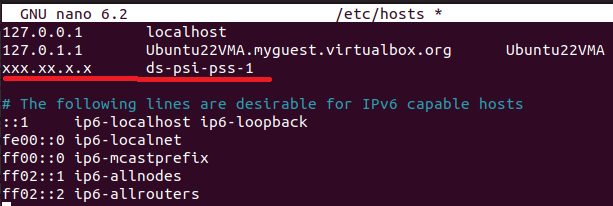
An important note is that the username on the local machine and the target machine need to match. A user needs an account with the same name on both machines and both users need sudo access. Also when the iac_deployer tool is run it will ask for a sudo password for the target machine. This is actually an Ansible security feature. When it asks for ‘BECOME password’ enter the sudo password for the target machine.
The following playbook should be used for deployments at the Digital Signal PSI: pss-test-machine-0_4_1_C1_G1_F0. This playbook installs a Cheetah spin that includes CPU and GPU capability but not FPGA. The FPGA installation is not included yet as our deployment scripts are not ready for this yet. It also installs our testing tool, ProTest. The deployment command is as follows:
$ ./iac_deployer machines deploy pss-test-machine-0_4_1_C1_G1_F0